Posts

Showing posts with the label Layout Command Control

Dispatcher's Desk

Image
It's been a temporary setup from the start.  A couple short metal filing cabinets and a scrap piece of plywood.  Add to that an old laptop and that was it - the dispatcher's office!  But a few op sessions quickly showed it was uncomfortable, limited in working space, and looked sloppy.  What to do? The good news is that using the temporary setup showed what was needed for the functionality of the office.  It's a small space - a repurposed hallway that used to go to the kids bedrooms... the same ones that were removed for the layout.  I did not want to remove the hallway as at some point, this will have to be converted back to living space.  So the idea was to cut a single piece of 3/4" plywood into the proper shape, finish it, and set it on stringers attached to the walls.  The desk itself then would have plenty of legroom under.  Experience showed the desk needed a side-table to store the car-card/train packs.   I elected to use bi...
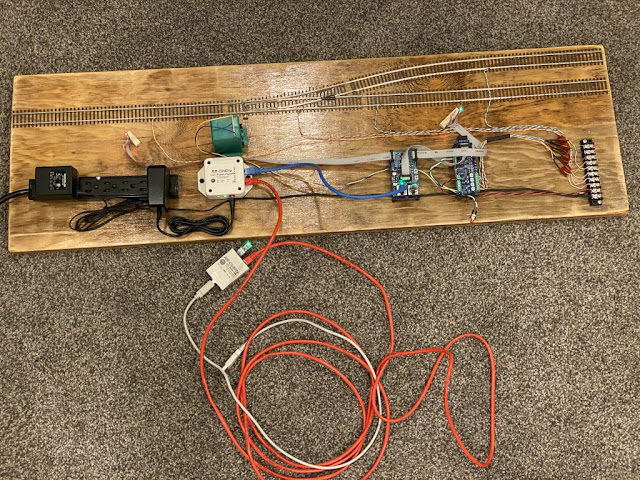
LCC Demo Layout

Image
Dipping my toes into the waters of LCC has raised questions by fellow model railroaders in the area.  Last year I was asked to do a clinic on LCC, which went very well.  The clinic included passing around the various LCC components for folks to see, feel and smell.  However one consistent comment I received was that they wanted to see it operational.  Fair enough - and it really is nicer to see the pieces all pulled together and working to understand how it should look.  So for the upcoming clinics, I have pulled together a little demo layout. Overview of the LCC Demo Layout The goals for this layout included showing how it worked in a small, portable footprint.  As such, it was not set up for continuous running or even operation.  Instead it is a small section of track with a single turnout, some detection, and a few signals.  It contains a single node - an RR-Cirkits Signal-LCC board, with a single I/O card: a BOD4-CP. A few features o...

LCC - Configuring a Push Button ~WITH~ Indication

Image
A few months ago there was a post on the LCC Groups.IO forum talking about the ability for one of the LCC node I/O points to both act as an INPUT, that is, to accept a push button command, AND act as an output, such as to illuminate an indicating light.  This is super cool!  Why?  Well at an all-in cost of around $3 per I/O point, it's hard to justify a lot of indicating lights on panels.  BUT... if we can get a "free" output for each discrete input, well, that is just like having your cake and eating it too!  (Never totally understood that analogy, but seems fitting.) The way this works is the node runs the I/O point as an output for 63 milliseconds, and then for a few milliseconds, it converts the output to an input where it polls the input.  So if it detects a "low" or a "high" in this window, it creates the appropriate event.  Slick, huh?  Timing at 63 ms is fast enough that even if the PB is just momentarily touched, it is enough to trigger...

Configuring Push-buttons for Turnout Control in LCC (with BONUS section on Adapting JMRI for Feedback)

Image
So ALL the efforts, costs, brain damage and such to get LCC integrated into the layout is paying off in this one new step.  Let me explain. With LCC, each node is essentially its very own stand-alone microprocessor, capable of processing commands INDEPENDENTLY of a central PC or other server.  It just is connected to at the CAN bus, either looking for commands to respond (consumer) to or to issue them (producer).  SO... this addresses one of the goals of integrating LCC into my layout.  Sometimes I like to come down into the layout room and just run trains.  I don't have others with me, and for me, its a great way to unwind.  When I do that, I don't want to have to futz with turning on a PC and getting it going.  Ya, I know, some say it is not that big of a deal.  But if I am only going to be there for 5 or 15 minutes, seems like a hassle to mess with that.  I just want to through the power switch on, have the layout come to life, and run s...